| FILS HORIZONTAUX | SYMBOLES | BOUTONS | LABYRINTHES | SIMON | 6 MOTS SUR BOUTONS |
| CHIFFRES MEMOIRE | FREQUENCE RADIO |
FILS VERTICAUX | FILS CROISES | CADRAN LETTRES | MOLETTE |
|
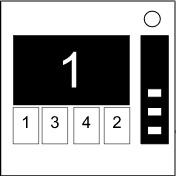
Appuyez sur le bon bouton pour passer à l'étape suivante. Réussissez toutes les étapes pour désactiver le module. Appuyer sur un mauvais bouton réinitialisera le module à l'étape 1. Les boutons sont ordonnés de gauche à droite. étape 1 : Si l'écran affiche 1, appuyez sur le bouton en deuxième position. Si l'écran affiche 2, appuyez sur le bouton en deuxième position. Si l'écran affiche 3, appuyez sur le bouton en troisième position. Si l'écran affiche 4, appuyez sur le bouton en quatrième position. étape 2 : Si l'écran affiche 1, appuyez sur le bouton portant le chiffre ' 4 '. Si l'écran affiche 2, appuyez sur le bouton à la même position qu'à l'étape 1. Si l'écran affiche 3, appuyez sur le bouton en première position. Si l'écran affiche 4, appuyez sur le bouton à la même position qu'à l'étape 1. étape 3 : Si l'écran affiche 1, appuyez sur le bouton ayant le même chiffre qu'à l'étape 2. Si l'écran affiche 2, appuyez sur le bouton ayant le même chiffre qu'à l'étape 1. Si l'écran affiche 3, appuyez sur le bouton en troisième position. Si l'écran affiche 4, appuyez sur le bouton portant le chiffre ' 4 '. étape 4 : Si l'écran affiche 1, appuyez sur le bouton à la même position qu'à l'étape 1. Si l'écran affiche 2, appuyez sur le bouton en première position. Si l'écran affiche 3, appuyez sur le bouton à la même position qu'à l'étape 2. Si l'écran affiche 4, appuyez sur le bouton à la même position qu'à l'étape 2. étape 5 : Si l'écran affiche 1, appuyez sur le bouton ayant le même chiffre qu'à l'étape 1. Si l'écran affiche 2, appuyez sur le bouton ayant le même chiffre qu'à l'étape 2. Si l'écran affiche 3, appuyez sur le bouton ayant le même chiffre qu'à l'étape 4. Si l'écran affiche 4, appuyez sur le bouton ayant le même chiffre qu'à l'étape 3. |